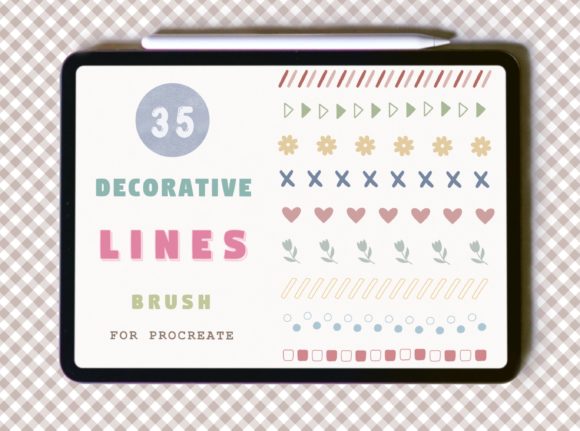
Decorative Lines Brush for Procreate: A Comprehensive Evaluation
Digital illustration often relies on a balance between organic, hand-drawn strokes and precise, repeatable elements. For artists seeking to introduce intricate patterns or structured borders without spending hours drawing each line individually, the Decorative Lines Brush for Procreate offers a specialized solution. This tool is designed specifically for the iPad application, providing a set of 35 distinct decorative lines that function as stamps within the canvas environment.
When evaluating digital assets, it is crucial to understand the specific utility they bring to a workflow. This brush set is not a traditional paintbrush that mimics bristles or ink flow; rather, it is a collection of pre-drawn vector-like shapes that can be applied instantly. The following analysis explores the functionality, benefits, limitations, and ideal use cases for this product to help creators determine if it aligns with their artistic goals.
Understanding the Tool and Its Functionality
The core of this product is a single .brushset file contained within a ZIP archive. Upon installation, users gain access to 35 unique decorative lines. Unlike standard brushes that respond dynamically to pressure, tilt, or speed, these stamps are static in their form but dynamic in their placement. They are designed to be used in any color or opacity, allowing them to blend seamlessly into various color palettes.
A key feature of these lines is their scalability. Because they are treated as stamp tools, artists can resize them using two fingers before placing them on the canvas. This flexibility ensures that the same brush can serve as a delicate border for a small icon or a bold divider for a large poster layout. However, it is important to note the technical constraints regarding input devices. While the download specifies compatibility with an Apple Pencil, the lack of pressure sensitivity means that the stroke weight remains constant regardless of how hard the stylus is pressed. This characteristic suggests that while an Apple Pencil provides the most intuitive experience, other compatible styluses may also function effectively, provided they support touch input.
Reasons to Consider Decorative Lines Brushes
Artists often seek efficiency when working on projects with repetitive elements. There are several practical reasons why a creator might choose this specific set over manual drawing techniques:
- Workflow Efficiency: Drawing complex geometric or floral lines by hand requires significant time and steady hands. These stamps allow for immediate application, drastically reducing the time required to finish illustrations that require framing or patterned backgrounds.
- Consistency: When creating a series of images, such as social media graphics or a comic book page, maintaining consistent line styles can be challenging manually. Using a standardized set of 35 lines ensures visual uniformity across all pieces in a project.
- Color Versatility: Since the lines can be changed to any color or opacity, they offer high adaptability. An artist can create a monochromatic sketch and then overlay these lines in gold or silver to add a metallic effect without needing separate texture layers.
- Non-Destructive Editing: As stamps, these lines can be placed on their own layer. This allows for easy repositioning, scaling, or deletion after the fact, which is essential for iterative design processes.
Benefits and Tradeoffs
Evaluating any digital tool requires looking at both its strengths and its limitations. The primary benefit of the Decorative Lines Brush for Procreate is its ease of use and immediate impact. It bridges the gap between freehand artistry and graphic design elements, making it accessible to illustrators who may struggle with perfect geometry.
However, there are tradeoffs to consider. The most significant limitation is the lack of pressure sensitivity. Traditional brushes allow for variation in line weight based on how firmly the artist presses, adding a sense of life and movement to the artwork. These stamps do not offer this nuance. Every stroke will have the exact same thickness unless resized manually. Consequently, the resulting lines may appear flat or "stamped" if not integrated carefully with other hand-drawn elements.
Another consideration is platform exclusivity. The product is explicitly designed for Procreate and will not work in other programs like Photoshop, Clip Studio Paint, or Krita. This restriction limits the portability of the asset. If an artist works across multiple platforms or needs to share files with collaborators using different software, this brush set cannot be utilized outside the Procreate ecosystem.
Ideal Use Cases and Scenarios
This tool finds its strongest application in specific scenarios where precision and pattern are more valuable than organic variation. It is particularly well-suited for:
- Graphic Design and Layouts: Creating headers, footers, and dividers for digital posters, flyers, or presentation slides where clean, decorative lines are needed quickly.
- Pattern Creation: Artists designing seamless patterns for textiles or wallpapers can use these lines as foundational elements to build complex repeating motifs.
- Character Illustration: Adding details to costumes, armor, or clothing trim. Instead of drawing every stitch or lace detail, an artist can apply these lines to suggest texture and decoration efficiently.
- Card and Stationery Design: Greeting cards often rely on ornate borders. This set allows for rapid prototyping of card designs with varying levels of complexity.
When Alternatives May Be Worth Considering
While this set is powerful for its intended purpose, it may not be the right choice for every situation. Artists should consider alternatives if their primary goal is:
- Organic, Hand-Drawn Textures: If the project requires rough, sketchy, or painterly lines that mimic real-world media, a dedicated calligraphy or textured brush set would be more appropriate.
- Pressure-Sensitive Control: Projects that rely heavily on line weight variation to convey depth or motion (such as manga or expressive figure drawing) will suffer from the static nature of these stamps.
- Cross-Platform Workflows: If the artist frequently switches between iPad and desktop software, investing in a universal format or learning to draw the lines manually might save time in the long run compared to being locked into one app's proprietary file type.
Practical Decision-Making Insights
Before purchasing or downloading the Decorative Lines Brush for Procreate, potential users should assess their current skill level and project requirements. If you are an illustrator who values speed and consistency over organic line variation, this tool is likely a strong fit. The ability to resize and recolor the lines makes it a versatile addition to a digital toolkit, provided you are comfortable with the "stamped" aesthetic.
Conversely, if you are a beginner looking to learn the fundamentals of line control, relying on these stamps might hinder your development of hand-eye coordination. In that case, practicing drawing similar lines manually would yield better long-term results.
Ultimately, the decision rests on whether the priority is efficiency and structure or fluidity and expression. For designers and illustrators working on commercial projects, branding materials, or stylized character art where decorative precision is key, this set of 35 lines offers a practical and effective solution. By understanding the specific constraints—such as the lack of pressure sensitivity and the Procreate-only requirement—artists can integrate these brushes strategically to enhance their workflow without compromising the overall quality of their work.